
Running a cross-border setup from your phone is realistic now, if you pick the right tools. The piece that makes it work is the company formation dashboard app on your iOS or Android home screen: one place where the filing status, the registered agent mail, the bank onboarding and the compliance calendar all show up without opening a laptop. But a dashboard is only a window. What matters is the data moving underneath it, and the first dataset it has to show you honestly is time.
The timeline spread a dashboard has to show
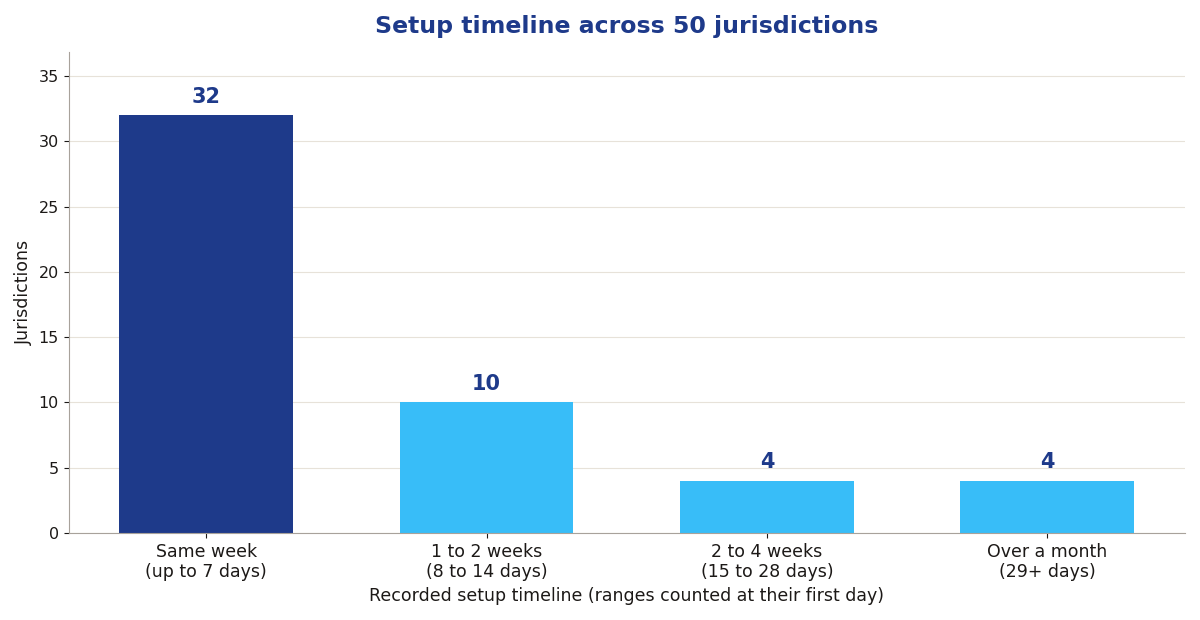
Source: IncorporateCompare jurisdiction database, 50 jurisdictions, Sep 13, 2026 snapshot; recorded setup timelines, with ranges such as 1 to 3 days counted at their first day.
Of the 50 jurisdictions in the database, 32 record a setup timeline of a week or less, and six of them record a timeline that starts at a single day. Another 10 land in the one to two week band. Then the tail stretches: 4 jurisdictions take two to four weeks, and 4 more run past a month, with recorded timelines of 35, 60 and 90 days at the far end. That spread is the whole argument for a dashboard. A formation that takes one day needs no tracking at all. A formation that takes 90 days needs document requests, status changes and deadline nudges surfaced on your phone, because you will not keep a browser tab open for three months.
The fast end is genuinely fast: Georgia, New Zealand and Canada record a one-day timeline, and Delaware, Wyoming and New Mexico record one to three days. The slow end is a different world: Switzerland at 21 days, Mauritius and Paraguay at 35, Uruguay at 60 and Chile at 90. A founder incorporating in Chile from a phone is running a quarter-year project with document requests landing at random; a founder incorporating in New Zealand is done before lunch. The dashboard has to treat those as different jobs, because they are.
Formation status is not the only thing worth tracking, either. Seven of the 50 jurisdictions require a local director, which means a dashboard needs a slot for a person, not just a filing. Twenty-nine of the 50 keep no public register, so the app becomes your only organised record of who owns and runs the company. And every jurisdiction in the database carries its own annual filing requirements, from a simple annual return to audited financial statements, which is why the compliance layer below matters as much as the formation tracker.

So judge any dashboard app by a simple test: does it show the jurisdiction timeline as recorded data, with the slow steps named, or does it show a generic progress bar? The first kind helps you plan cash and launch dates. The second kind is decoration.
The phone stack that actually works
- Comparison databases: jurisdiction, cost, tax, and timeline data in one search. This is the research layer; do it before you pay anyone.
- Formation dashboards: doola, Firstbase, and ZenBusiness all run formation tracking and compliance alerts from mobile.
- Registered agent portals: Northwest and Bizee scan and forward legal mail to your phone. Your company's legal address lives in an app.
- Banking apps: Mercury, Wise, and Relay onboard businesses remotely and run entirely from mobile.
- Compliance trackers: annual report and franchise tax deadlines with filing, not just reminders.
The stack that works: research on a comparison database, form through a dashboard, bank through a mobile-first bank, and track compliance where your agent lives. Each layer hands off to the next, and the dashboard is where you watch the handoffs happen.
Run the match before you download anything
Before you commit to a stack, run your own facts through the two free tools on this site. The Jurisdiction Match Quiz asks six questions on tax, privacy, banking, budget, directors and speed, then ranks the 50 jurisdictions against your answers. The Total Cost Calculator then prices your shortlist properly: setup cost plus the annual government fee, side by side over three years, so a fast but expensive jurisdiction cannot hide behind a cheap headline. Do both from your phone; that is rather the point of this article.
Skip any tool that only works on desktop. Your company does not have a desk.